
Authentication with an API key
This page explains how to authenticate with the Ferry system using an API key, including HTTP header formatting, key structure, key creation and safe rotation workflows, and understanding authentication error codes.
How to send a key
Section titled “How to send a key”Every request sent to partner-tier endpoints must include the API key in the HTTP request header using standard Bearer format:
Authorization: Bearer <API_KEY>The Ferry system only reads the Authorization header. Other headers have no authentication effect.
Key format
Section titled “Key format”A complete API key consists of 3 parts joined by underscores (_):
- System prefix: A prefix string configured by Ferry per environment. Partners do not need to parse or alter this value; simply send the issued key string verbatim.
- Key identifier: A 24-character hexadecimal string identifying the key record in the system.
- Secret token: A 64-character hexadecimal cryptographically secure random string.
This documentation never prints a sample key string. Partners must always send the issued key string verbatim, without trimming, reassembling, or altering any characters. The diagram below illustrates the authentication and authorization flow for an incoming API request:
sequenceDiagram autonumber participant Partner as Partner System participant Gateway as Ferry API Gateway participant Auth as Key Auth Layer participant Perm as Permission Layer participant Core as Business Layer Partner->>Gateway: Send request with Authorization header Gateway->>Auth: Validate API key integrity alt Missing header or invalid key Auth-->>Partner: 401 Unauthorized (invalid key) else Valid key Auth->>Perm: Pass organization context and role alt Insufficient permissions or transient authorization error Perm-->>Partner: 403 Forbidden (Access denied) else Authorized Perm->>Core: Execute business logic Core-->>Partner: 200 OK with response payload end endWho creates keys and how
Section titled “Who creates keys and how”Partners cannot create API keys programmatically through API endpoints. Key creation is strictly restricted to agency users holding the admin role on the web Dashboard interface.
Steps to create a key on the Dashboard:
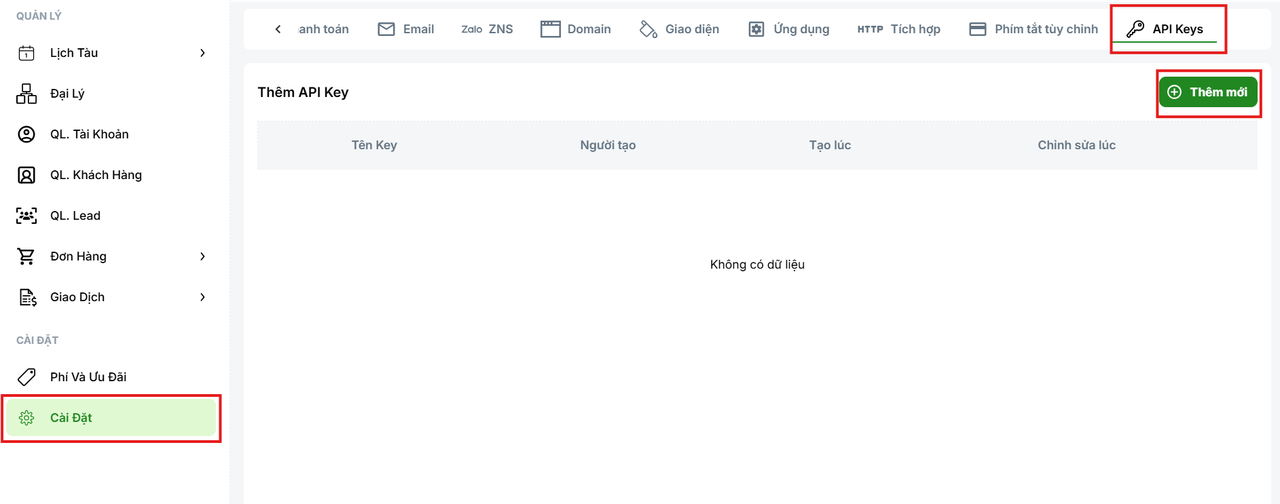
- An administrator signs in to the agency Dashboard, opens the Settings menu, switches to the API Keys tab, and clicks the Add New button.
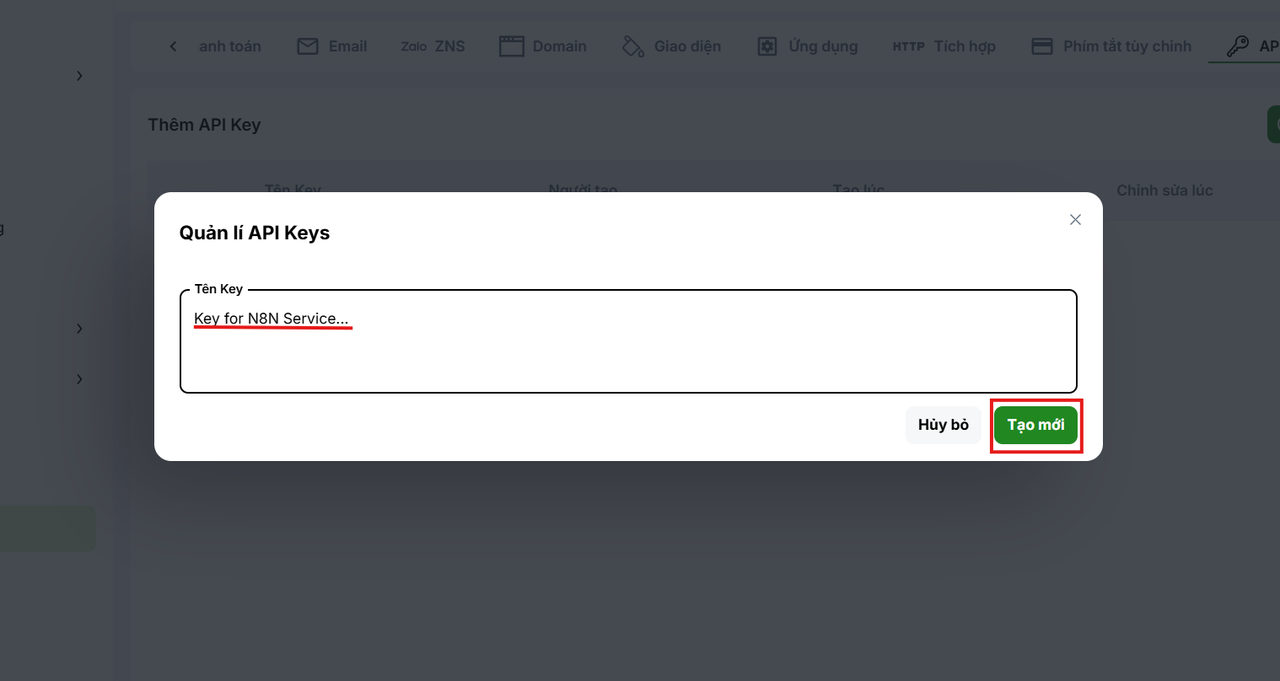
- Enter a descriptive key name (such as your integrating service name) in the dialog and click Create New.
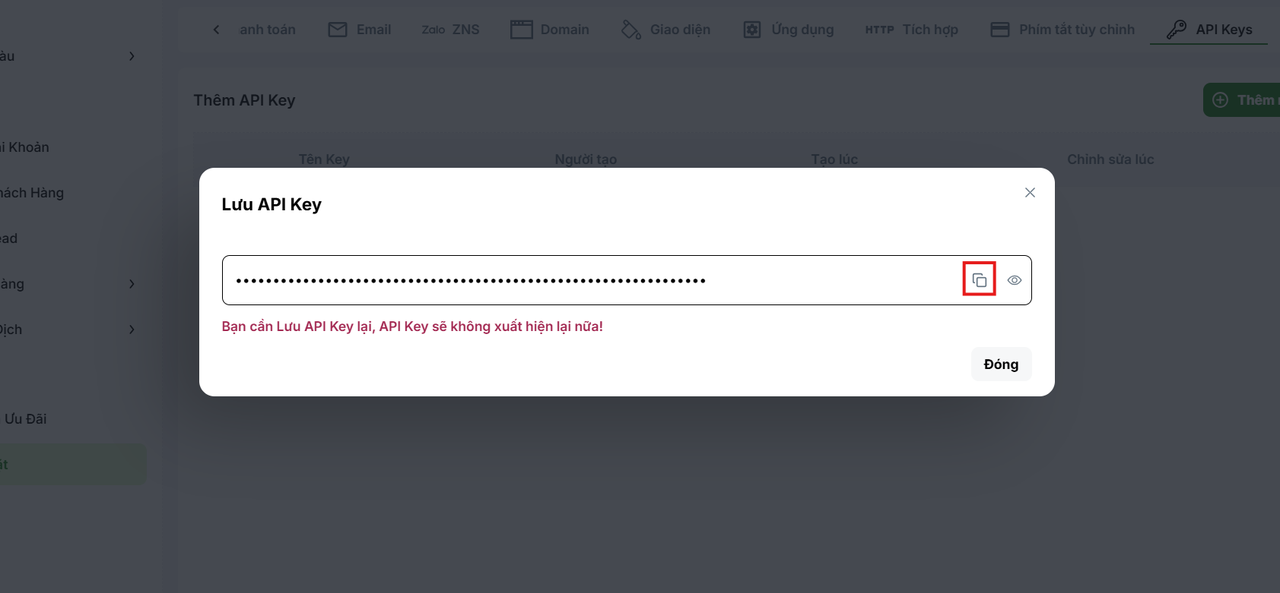
- A success dialog appears showing the newly generated key. Click the copy icon to store the key in a secure location.
For complete Dashboard operational instructions, see API Key Management on Dashboard.
Key lifecycle and characteristics
Section titled “Key lifecycle and characteristics”Ferry API keys have the following operational characteristics:
- Never expire: Keys do not have an automated expiration period. Once generated, a key remains valid indefinitely until an administrator explicitly revokes it.
- Immediate revocation: When an administrator deletes a key on the Dashboard, the key record is permanently deleted from the database. The very next call using that key receives an HTTP 401 error immediately.
- No temporary suspension: The system does not support pausing or temporarily disabling a key. Keys exist in only two states: active or permanently deleted.
API key permissions
Section titled “API key permissions”Each API key is bound to a single agency organization and represents the full operational authority of that organization:
| Business domain | API key capabilities |
|---|---|
| Bookings and passengers | Create tentative bookings, confirm e-ticket issuance, query and update orders |
| Schedules and voyages | Search sailings, retrieve cabin layouts, and check seat availability counts |
| Cash flow and credit | View transaction history, check credit ledger entries, and inspect available balance |
| Pricing and discounts | Inspect price additions, verify surcharge rules, and validate voucher codes |
| Customers and sub-agencies | Manage customer profiles, company records, and subordinate agency entities |
| Cancellations | Submit ticket cancellation requests to operators |
Important authorization boundaries and risks:
- No granular scopes: There are no “read-only” keys or keys restricted to individual modules. A key possesses complete business management capabilities for the organization.
- Sub-organization deletion risk: Key permissions include creating, editing, and deleting child organizations within your agency hierarchy. A compromised key can be exploited to delete child organizations.
- No access to internal areas: API keys cannot perform system administration tasks or access Dashboard features requiring user JWT sessions.
- Missing response fields due to role serialization: API keys are assigned the
api-keyrole group by the system. Response payloads only include fields explicitly exposed for this group. If you observe a field visible on the Dashboard (such as detailed fares or discounts) that is absent in the API response (even with HTTP 200), that field is not declared for theapi-keyrole. This is not an authorization failure (no 403 is returned); it cannot be resolved with query parameters and requires Ferry to update the field serialization mapping.
Safe key rotation workflow
Section titled “Safe key rotation workflow”Because key revocation takes effect immediately, rotating an active key in production must follow this 4-step sequence to avoid service downtime:
- Create new key: An agency administrator generates a new API key on the Dashboard. During this step, the old key continues serving live requests without interruption.
- Update servers: Deploy the new key to environment configurations across all backend service instances.
- Verify traffic: Monitor incoming responses to confirm that 100% of outgoing traffic has successfully switched to the new key.
- Revoke old key: The agency administrator logs in to the Dashboard and deletes the old key to complete the rotation cycle.
If a key is compromised or leaked, accept temporary downtime: delete the compromised key immediately, then generate a replacement key and deploy it.
Understanding authentication error codes
Section titled “Understanding authentication error codes”When calling APIs with an API key, you may encounter two HTTP status codes related to authentication and authorization:
| HTTP Code | Technical meaning | Common root causes | Recommended resolution |
|---|---|---|---|
| 401 Unauthorized | Invalid key | Missing Authorization header, incorrect Bearer prefix, invalid key string, or revoked key | Verify header syntax; paste the key verbatim; generate a new key if revoked |
| 403 Forbidden | Access denied (Access denied) | (1) Key lacks permission for the endpoint (internal or unexposed route); (2) Ferry’s authorization layer is experiencing a transient connection issue | For new endpoints: verify against the 86 partner routes. For unexpected 403s on normally working endpoints: perform limited retries; if persistent, contact Ferry |
Important notes:
- 401 responses return a generic message without detailing the exact cause (invalid format, wrong secret, or nonexistent key) to prevent enumeration and timing attacks.
- 403 responses return the exact same message
Access deniedfor both cases: actual permission denial or a temporary glitch in the authorization layer. Diagnostic details are logged internally. Therefore, if 403 errors occur suddenly on requests that normally succeed, perform limited retries with exponential backoff before assuming permissions were revoked.
Common misconceptions
Section titled “Common misconceptions”| Misconception | Reality | Correct practice |
|---|---|---|
| Sending the key via alternative headers | Ferry only reads the Authorization header | Always set Authorization: Bearer <key> |
| Embedding keys inside mobile or client web apps | Keys hold full operational authority for the agency, including deleting child organizations | Store keys securely on your backend servers |
| Deleting the old key before configuring the new one | Deletion takes effect immediately, breaking service | Create the new key, deploy it, and only then delete the old key |
| Assuming keys will expire automatically | Keys have no expiration date | Establish an internal scheduled key rotation policy |
| Assuming 403 always means revoked permissions | 403 is also returned during transient authorization service errors | Perform limited retries; if persistent, contact Ferry operations |
| Assuming missing response fields mean missing permissions | Certain fields are not mapped for the api-key role group | Contact Ferry to expose needed fields for the API key role |
Where to look in Scalar
Section titled “Where to look in Scalar”This guide corresponds to the Authorize button located in the top bar of the Scalar UI — Ferry VN API documentation portal.
To test endpoints in the Scalar interface:
- Click the Authorize button.
- Paste your API key into the Bearer token field.
- Test a simple read endpoint such as
VoyagesorBookingsto confirm that your key is working.
Read next
Section titled “Read next”| Guide | Recommended next reading |
|---|---|
| Integration surface overview | Understand permission boundaries and partner-accessible business groups |
| Environments | Managing API keys across the UAT and Production environments |
| General conventions | Standards for cursor pagination, date-time formatting, and error handling |
| API Key Management on Dashboard | Step-by-step Dashboard operations manual for agency administrators |